


Local Weather: Live & Hourly
4.250.00 Reviews
App Specs
- Version
- 1.0.30
- Updated On
- License
- Free
- Downloads
- 100,000+
- Developer
- HLIMATE INNOVATIONS PRIVATE LIMITED
- Categories
- Weather
- Platform
- Android
Screenshots
 Analysis by AppCompare
Ever found yourself caught in the rain without a trusty umbrella or shivering in shorts when the temperature unexpectedly drops? Well, I’ve been there, and it’s not fun. That’s why I decided to try out Local Weather: Live & Hourly, an app that promises to keep you one step ahead of Mother Nature. Let’s dive into all the details of this weather app to see if it’s worth a spot on your home screen.
For me, a weather app earns a place on my phone when it helps me make a decision quickly, not just when it displays a lot of information. I want to know whether to take a jacket, shift a walk, or leave extra time before heading out. Local Weather: Live & Hourly is aimed at those everyday checks, with forecasts that look ahead through the coming hours and days rather than treating weather as a single snapshot.
Who will get the most from it
I’d recommend this kind of focused local forecast to someone whose plans change with the weather: commuters, parents arranging school runs, people walking or cycling, and anyone who likes to decide on outdoor plans on the day. It is also useful if you check the forecast more than once, because an hourly view can answer a different question from a daily summary: not simply whether rain is expected, but whether it may affect the time you plan to be outside.
A realistic routine would be to check the daily outlook while getting ready, then look at the hourly details before leaving for an appointment. If conditions appear likely to shift, an alert can serve as a prompt to check again rather than as a reason to assume that every detail is settled. I find that distinction important: forecasts are decision aids, not guarantees, and local conditions can change faster than a quick glance suggests.
How I’d fit it into a weather routine
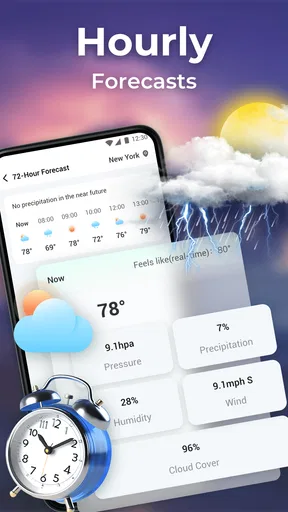
The app’s 72-hour outlook is most useful for near-term choices: deciding whether to dry laundry outside, planning a short walk, or choosing which day of the next few is better for an outdoor errand. For anything further away, I would treat a forecast as an early indication and recheck closer to the time. That keeps a useful planning window from turning into false confidence about conditions that may still change.
A small practical tip is to compare the hour you care about with the hours immediately before and after it, rather than focusing on one isolated forecast point. A gradual change can matter just as much as a sharp one: a dry start may give way to rain during a return journey, for example. The app’s hour-by-hour layout makes that kind of timing check more natural than relying only on a single daily high or low.
First Impressions and User Interface
The first thing I noticed about Local Weather: Live & Hourly is its sleek and intuitive design. Upon launching, you’re greeted with a clean interface that doesn’t overwhelm you with too much info at once. Instead, it provides just what you need to know right away: the current weather, temperature, and an hourly breakdown. Navigating through the app feels like a breeze, pun intended, with easy-to-understand icons and a straightforward layout.
Worth Reading Before You Choose

Baby Panda World Brings Quick Play to Modern Phones, but Its Game Library Feels Busy

ESPN’s Live Game View Makes Following Close Games Easier

QuizzLand Review: A Good Fit for Short Trivia Breaks, Not Every Player

Basketball Stars: Multiplayer Is Fast, but Can It Recover When Matches Go Wrong?

WEBTOON Turns Phone Updates Into a Better Reading Routine

Link to Windows Runs on Shared Habits, Not Social Feeds
That simple first screen is a good fit for quick checks, but I would not use it as a substitute for thinking through the whole outing. Before a longer trip, I’d look at the forecast over the relevant hours and pay attention to the conditions that affect my plans, such as wind or humidity, rather than stopping at the current temperature. The benefit is less about finding a single perfect number and more about seeing enough context to make a sensible choice without digging through layers of menus.
Features That Stand Out
One standout feature is the detailed hourly forecast. It’s perfect for planning your day, especially if you’re someone who likes to squeeze in outdoor activities. Whether you're a jogger, picnic planner, or just someone who hates surprises, this feature is your new best friend.
For someone deciding whether to walk now or later, the hourly view is more actionable than a broad “sunny” or “rainy” label. I’d use it to choose a departure time, then check again before setting off if the weather is changeable. That second look is especially worthwhile when the forecast affects a commitment, such as an outdoor appointment, because a forecast window is helpful guidance but cannot promise exactly what will happen at one particular street or moment.
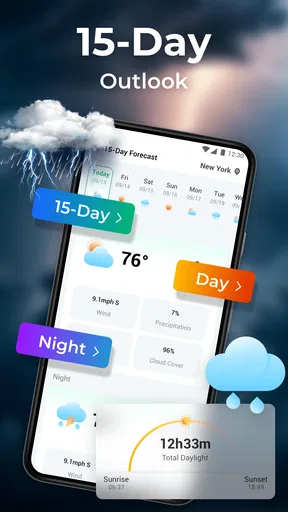
The daily forecast serves a different purpose. It is useful for comparing the general shape of nearby days when I’m choosing when to run errands or schedule a casual outdoor plan. I would still keep plans flexible if the weather matters a lot, and I would avoid treating an early outlook as a firm promise. Used that way, the hourly and daily views complement each other: one helps with timing, while the other helps with broad planning.
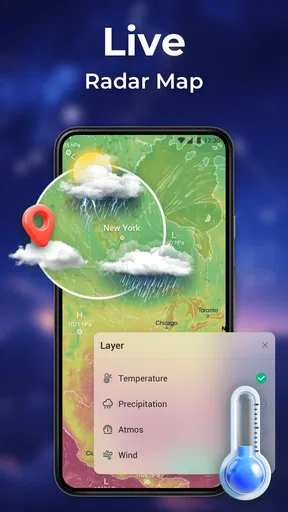
Another cool feature is the live radar. It provides real-time updates on weather changes, which is super handy if you live in an area with unpredictable weather patterns. I tested it during a particularly stormy day, and it accurately tracked the storm’s progress, allowing me to adjust my plans accordingly.
Radar is most useful to me as a visual check when I need to decide whether to leave now, wait, or take a different approach to an outdoor task. It can make a developing weather situation easier to understand than a text summary alone. I’d still pair the map with the forecast and my own observation outside: a radar display is a tool for judging movement and timing, not a reason to assume every shower will behave exactly as expected.
Custom Alerts
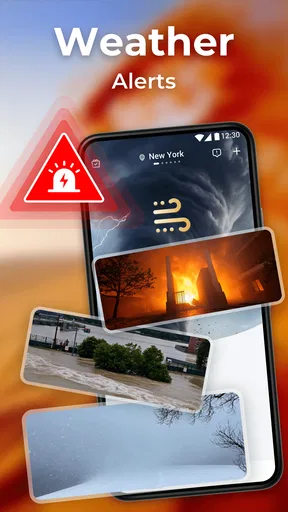
Now, let’s talk about custom alerts. This feature is a lifesaver. You can set up notifications based on your preferences, whether it’s a daily weather summary or alerts for severe weather conditions. No more getting caught off guard by sudden weather changes!
I’d be selective about notifications rather than enabling every possible prompt. A daily summary may suit someone who likes a morning reminder, while severe-weather alerts are more relevant when changing conditions could affect safety or travel. Keeping alerts focused helps them remain useful instead of becoming background noise. I would also treat an alert as a cue to open the app and review the situation, especially before making a decision that depends on precise timing.
One common question is whether alerts remove the need to check the forecast manually. In my view, they do not. Notifications are helpful for drawing attention to a change, but a quick look at the hourly outlook is still worthwhile when I am about to leave or commit to an outdoor plan. That combination—alerts for awareness and a deliberate check for context—is a more dependable habit than relying on either one alone.
Additional Perks
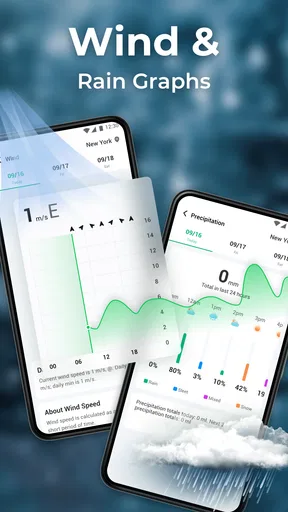
The app also offers a neat little widget you can place on your home screen. It’s a quick way to check the weather without diving into the app. Plus, for those who love details, there’s an in-depth section with UV index, wind speed, and humidity levels.
The widget is best for glanceable information, not for deciding every detail of a day. I’d use it to notice a change before leaving home, then open the full forecast if the timing or conditions matter. That two-step workflow keeps the home screen convenient without asking a small widget to replace the app’s more detailed views.
The extra readings are most valuable when they answer a specific question. Wind can affect a bike ride or make a mild temperature feel less comfortable; UV information can help me think about sun exposure; humidity can explain why a day feels muggy even when the temperature alone seems manageable. I wouldn’t check every metric every time. Picking the details that match the activity makes the information easier to act on.
Performance and Reliability
In terms of performance, Local Weather: Live & Hourly runs smoothly without lag. I didn’t encounter any crashes or bugs during my testing period, which is always a plus. The data refreshes promptly, ensuring you have the latest information at your fingertips.
Forecast reliability is not identical everywhere or in every kind of weather, so I would avoid judging the app by a single successful or disappointing prediction. For a routine commute or a short errand, a forecast that is broadly useful is often enough. For a decision with a higher cost—such as a long outdoor activity—I’d check again nearer the start and stay alert to changing conditions rather than assuming that an earlier forecast will hold.
As for reliability, the forecasts have been pretty spot on. I checked its accuracy by comparing it with other weather services, and it held up well, proving it to be a trustworthy source for your daily weather needs.
Compared with the weather tools built into a phone, this app’s appeal is its direct emphasis on local conditions, a near-term hourly view, radar, and alerts in one place. A basic system app may be enough if all I need is today’s temperature with no extra steps. A more elaborate weather service may suit someone who wants specialist maps or extensive technical detail. I see this app as a practical middle ground for everyday planning, rather than a replacement for every specialist forecast or official warning source.
Room for Improvement
While Local Weather: Live & Hourly is quite impressive, there’s always room for improvement. It would be great to see more personalization options, like different themes or additional languages for global users. Also, while the app is mostly ad-free, there are occasional pop-ups that can be slightly distracting, although they’re not a dealbreaker.
That makes it less suited to someone who expects a highly tailored interface or wants every visual element adjusted to personal taste. The pop-ups are a small but real interruption, particularly when I open the app for a fast check. If an uncluttered, uninterrupted experience is your top priority, it is worth considering whether that friction would bother you in daily use.
There is also a useful distinction between a general weather app and a tool for high-stakes decisions. I would not rely on one consumer forecast alone for activities where severe conditions could put people at risk. In those situations, I’d use the app to stay aware of local developments while also checking relevant official guidance. For ordinary plans, its combination of short-range forecasts and alerts is more than enough to help me adjust sensibly.
What the current release means for existing users
The app is currently at version 1.0.24, following its release on December 29, 2023. That gives existing users a clear point of reference for the version they are using, but I would not infer a particular new feature or change from the version number alone. The practical test is whether the current forecast, radar, widget, and alert experience continues to fit the way you check the weather.
For someone deciding whether to try it now, the release history is less important than the everyday workflow: can you get a quick local check, inspect the hours you care about, and set alerts that are relevant to you? The app is free, rated for Everyone, and made by HLIMATE INNOVATIONS PRIVATE LIMITED. Its 4.2 average from around 720 ratings and more than 100,000 installs suggest that it has attracted a meaningful group of users, while still leaving room for personal preference to decide whether its presentation works for you.
It is designed for devices running Android 7.0 or later. That matters if you are considering installing it on an older phone; checking the operating-system version first can save an unnecessary trip to the download page. I would also judge it on the device you plan to use, since the convenience of a home-screen widget and alerts depends on how you prefer to check weather during the day.
Who should choose another option
I would skip it if you only want the most basic forecast and already have a built-in weather screen that does everything you need. I’d also look elsewhere if your routine depends on niche forecasting tools, extensive customization, or a specialist source for a particular outdoor activity. Local Weather: Live & Hourly is strongest as a straightforward everyday companion; expecting it to serve as a dedicated professional meteorology tool would be the wrong fit.
On the other hand, if you are tired of switching between a daily summary, a radar map, and separate alerts, having those kinds of checks gathered in one app may be useful. I would try it with a simple routine first: check the day ahead, use the hourly forecast when timing matters, and keep notifications limited to the changes you genuinely want to hear about. That gives you a fair sense of whether its style suits you without turning weather-checking into another chore.
Final Thoughts
Overall, Local Weather: Live & Hourly is a solid choice for anyone who wants to stay informed about the weather in a simple, efficient way. With its user-friendly interface, accurate forecasts, and helpful features like live radar and custom alerts, it’s definitely worth checking out. Whether you’re planning a weekend getaway or just need to know if you should bring a jacket, this app has got you covered. So why not give it a try and see how it fits into your daily routine?
Pros
- Detailed hourly forecasts available.
- User-friendly and intuitive interface.
- Real-time weather alerts provided.
- Customizable notification settings.
- Minimal data usage for updates.
Cons
- In-app ads can be intrusive.
- Limited radar functionality.
- May require frequent updates.
- Some features need premium access.
- Occasional location detection issues.
FAQs for Local Weather: Live & Hourly
What features does Local Weather: Live & Hourly offer?
Local Weather: Live & Hourly provides real-time weather updates, including current temperature, humidity, wind speed, and precipitation forecasts. It offers hourly and daily forecasts, severe weather alerts, and radar maps. Users can personalize their experience by setting favorite locations for quick access to weather information.
Is Local Weather: Live & Hourly free to use, or does it have a premium version?
The app is free to download and use, offering basic weather forecasts and updates. However, it also includes a premium version that offers additional features such as ad-free usage, advanced radar maps, and extended forecast details. Users can choose to upgrade for a more enhanced experience.
How accurate is the weather information provided by Local Weather: Live & Hourly?
Local Weather: Live & Hourly sources its data from reliable meteorological services, ensuring high accuracy in its forecasts. While no weather app can guarantee 100% accuracy, the app's real-time updates and detailed radar maps help users stay informed about changing weather conditions effectively.
Can I receive severe weather alerts through the app?
Yes, the app provides severe weather alerts to keep users informed of potential hazards such as storms, heavy rain, or extreme temperatures. Users can customize alert settings to receive notifications tailored to their location, ensuring they are prepared for any adverse weather conditions.
Does Local Weather: Live & Hourly support multiple locations?
Absolutely. The app allows users to save multiple locations for quick access to weather information. This feature is particularly useful for travelers or those with family in different regions, enabling them to monitor weather conditions in various areas simultaneously.


